Business owners who rely on Facebook for marketing and customer engagement are being targeted by a new Facebook suspension scam.
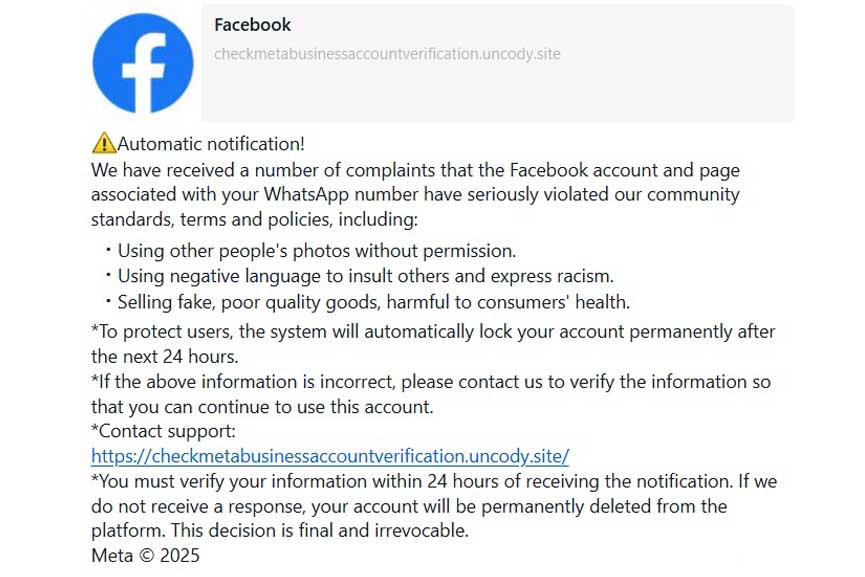
Cybercriminals impersonate Facebook/Meta, sending deceptive messages that falsely warn of account suspension. You can see an example message below. These fraudulent alerts prompt users to verify their accounts through fake links, exposing sensitive data, financial assets, and brand reputations to significant risk.
How this new Facebook suspension scam works?
Scammers send messages that appear to be official Facebook notifications, falsely claiming that a business page linked to a WhatsApp number has violated Meta’s community standards. Common allegations include:
Scammers send fake emails or messages that appear as official Facebook communications.
To create urgency, the message warns that the account will be permanently locked within 24 hours unless verification is completed through a provided link. This fraudulent URL mimics Facebook’s official domains but redirects users to a phishing site designed to steal login credentials and sensitive business data.
Why Facebook Suspension Scam is Dangerous?
A Facebook suspension scam is a type of online fraud where scammers attempt to trick users into believing that their Facebook accounts have been suspended, in an effort to steal personal information or money.
Business owners who depend on Facebook for advertising and customer interactions may panic and click the malicious link, unknowingly exposing their accounts to cyber criminals. Once scammers gain access, they can:
Hijack business pages and demand ransom for restoration
Access linked payment methods for unauthorized transactions
Exploit customer data for further fraudulent activities
Image credits: Riki32 @ Pixabay | Cropped by GBN
How to Protect Your Business from Facebook Scams
To safeguard your business account from this new Facebook suspension scam, follow these essential security measures:
Verify the Sender: Facebook does not send account suspension warnings via WhatsApp or private messages. Always check the legitimacy of any alert.
Inspect the URL: Official Meta and Facebook links end in ‘facebook.com’ or ‘meta.com’. Suspicious domains like ‘uncody.site’ indicate fraud.
Enable Two-Factor Authentication (2FA): This adds an extra security layer, requiring additional verification beyond your password.
Report Suspicious Messages: Forward scam messages to Facebook via the official help center and inform your team to stay cautious.
Avoid Clicking Unknown Links: If in doubt, visit Facebook’s official website directly to check for account notifications.
Facebook’s Official Response
Meta has issued official warnings against responding to fraudulent messages and advises users to rely on authorized support channels for account status verification. The company reiterates that it does not send suspension notices via external platforms like WhatsApp or third-party messaging services.
Stay Vigilant Against Cyber Threats
As cybercriminals continue refining their tactics, business owners must remain cautious. Staying informed and implementing strong security measures can prevent financial loss and reputational damage.
For more details on protecting your business from online scams, visit Facebook’s official security page or consult a cybersecurity expert.